Building an app is exciting. But once people start using it, one question quickly becomes important: How will users ask for help — and how will you respond professionally?
That was the next practical challenge for Fit Ogo™ — Smart Fitness Pal, a wellness and fitness platform being developed under Heuristic Labs Tech Insight.
Fit Ogo™ already had important app features in place: personalized workout plans, meal planning, recipe generation, meditation support, saved plans, progress tracking, and a dashboard experience. But a serious app also needs something less glamorous and more essential:
A reliable support system.
A contact form alone is not enough. Users need reassurance that their message was received. The business owner needs to be notified. The message needs to be stored safely. And if the app is related to wellness or fitness, the response process must avoid unsafe medical or health advice.
So we built a simple but powerful support automation system using Supabase, Make.com, Microsoft 365 Email / Outlook, and a React / TypeScript support page.
The Problem: A Contact Form Is Not Enough
Many websites and apps have a basic contact form. A user enters their name, email, subject, and message. Then they click submit.
But what happens next?
If nothing happens behind the scenes, the system is incomplete.
- The user does not know whether the message was received.
- The business owner may miss the message.
- There may be no saved record of the request.
- Support questions can become scattered across inboxes.
- Follow-up becomes harder as the app grows.
- Users may lose trust if they feel ignored.
For Fit Ogo™, the goal was not just to collect messages. The goal was to create a support workflow that felt professional, trackable, and trustworthy.
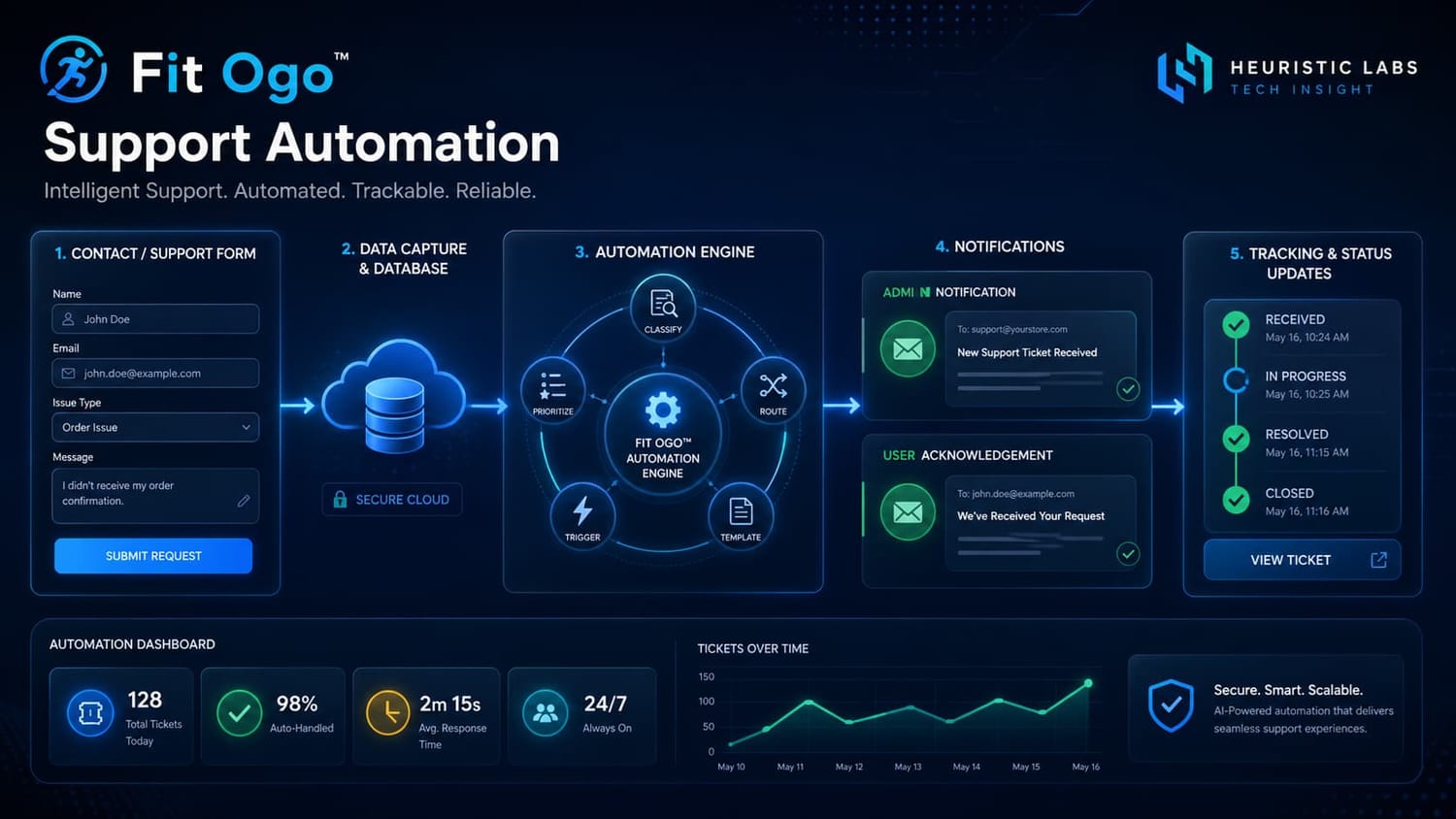
User submits a support message.
The message is saved in Supabase.
Make.com sends an admin notification and user acknowledgement.
The message remains available for human review.
The Goal: A Trust-Building Support Workflow
The support automation system was designed around one practical principle: Automation should improve trust, not replace responsibility.
That is especially important for Fit Ogo™ because it operates in the fitness and wellness space. Users may ask about workouts, meal plans, habits, progress, or personal wellbeing.
Automation can acknowledge a message and notify the team, but it should not automatically provide medical, injury, legal, billing, refund, or privacy advice without human review.
Responsible automation principle: Automate the safe, repetitive steps. Keep human review for sensitive issues.
The system was designed to automate:
- Saving the message
- Notifying the admin
- Acknowledging the user
- Tracking whether the automation ran
And it intentionally avoids automating risky support replies such as:
- Diagnosing health issues
- Giving injury advice
- Making medical recommendations
- Handling sensitive complaints without review
- Marking a message as “replied” when only an acknowledgement was sent
The Fit Ogo™ Support Automation Stack
1. React / TypeScript Contact Page
Fit Ogo™ uses a ContactSupportPage.tsx page with public routes such as /contact and /support.
The form captures:
- Full name
- Email address
- Request type
- Subject
- Message
The form also includes a wellness disclaimer reminding users that Fit Ogo™ provides general fitness, nutrition, habit, meditation, and lifestyle information only. It does not provide diagnosis, emergency care, or a substitute for professional medical advice.
2. Supabase Database
Messages are stored in a Supabase table named contact_messages.
contact_messages
- full_name
- email
- request_type
- subject
- message
- source
- status
- user_id
- metadata
- notification_sent
- auto_reply_sent
- make_processed_at
- make_error
This gives the app a reliable support record instead of depending only on email.
3. Supabase Database Webhook
When a new support message is inserted, Supabase sends the new row to Make.com using a database webhook. This means the app does not need to handle every automation step in the frontend.
4. Make.com Automation Scenario
Make.com receives the message and runs the workflow:
Custom Webhook
→ Admin notification email
→ User acknowledgement email
→ Supabase tracking update
5. Microsoft 365 Email / Outlook
Two emails are sent:
- An admin notification to info@hltechinsight.com
- A user acknowledgement email confirming the message was received
The Final Workflow: From Form to Support Automation
The final support automation flow looks like this:
User submits Fit Ogo™ support form
→ Supabase stores the message
→ Supabase triggers Make.com
→ Make.com sends admin notification
→ Make.com sends user acknowledgement
→ Make.com updates the Supabase tracking fields
→ Message remains marked as new for human review
The final tracking logic is important:
status = new
notification_sent = true
auto_reply_sent = true
make_processed_at = timestamp
make_error = null
This means:
- status = new means the message still needs human review.
- notification_sent = true means the admin was notified.
- auto_reply_sent = true means the user received an acknowledgement.
- make_processed_at shows when the automation completed.
- make_error = null means no Make.com error was recorded.
This avoids a common mistake: treating an automated acknowledgement as a real support reply.
Why Human Review Still Matters
Automation is helpful, but not every message should be handled automatically.
For Fit Ogo™, human review remains important because users may contact support about:
- Exercise discomfort
- Meal plan concerns
- Fitness goals
- Medical conditions
- Subscription questions
- Privacy questions
- Account issues
- Refund concerns
- Sensitive personal information
A responsible system should not automatically send detailed health or account advice without oversight. That is why the first version of the automation sends only a safe acknowledgement.
Important: Fit Ogo™ support automation sends acknowledgements and notifications, but it does not automatically provide medical, fitness injury, billing, legal, or privacy advice. Human review remains important.
Lessons for Small Business Owners and App Builders
1. Start with a simple workflow
You do not need a complex customer support platform on day one. A simple form-to-database-to-email workflow can already make your app feel more professional.
2. Keep a source of truth
Email alone is not enough. Storing support messages in a database gives you a record that can later power a support dashboard, admin review page, or analytics system.
3. Separate automation from human response
An auto-reply should not be treated as a final answer. It is only an acknowledgement. This protects both the user and the business.
4. Add tracking fields early
Fields like notification_sent, auto_reply_sent, and make_processed_at help you know whether your automation actually ran.
5. Build trust before adding complexity
It is tempting to automate everything immediately. But the better path is to automate the safe, repetitive steps first, then add smarter features later.
How This Supports Heuristic Labs Tech Insight
This support automation workflow is more than a Fit Ogo™ feature. It is also a practical example of what Heuristic Labs Tech Insight is building:
AI apps. Smart websites. Automation. Practical digital systems.
For small businesses, creators, coaches, solo founders, and app builders, automation does not need to be overwhelming. It can begin with one useful workflow that saves time and improves user trust.
A system like this can be adapted for:
- Fitness apps
- Coaching websites
- Online course platforms
- Local service businesses
- Affiliate websites
- Digital product stores
- SaaS dashboards
- Lead capture forms
- Customer enquiry forms
The key is not automation for its own sake. The key is automation that improves service.
Responsible Automation Matters
At Heuristic Labs Tech Insight, the goal is not to replace human care with automation. The goal is to use automation to support better communication, better tracking, and better follow-up.
For Fit Ogo™, that means:
- Messages are stored.
- The admin is notified.
- Users are acknowledged.
- Human review remains part of the workflow.
- Health and wellness boundaries are respected.
That is the right balance.
FAQ
What is support automation?
Support automation is the process of using software tools to handle repetitive support tasks such as saving messages, sending notifications, acknowledging users, and routing requests for review.
Can Make.com connect to Supabase?
Yes. A Supabase Database Webhook can send new database rows to a Make.com Custom Webhook. Make.com can then trigger emails, updates, notifications, and other workflow actions.
Should AI automatically reply to support messages?
Not always. AI can help draft replies, but sensitive topics such as health, billing, privacy, legal concerns, refunds, complaints, or urgent issues should be reviewed by a human before a response is sent.
Why store support messages in Supabase?
Supabase gives the app a reliable database record of support messages. This is useful for review, tracking, future dashboards, and long-term support history.
Why keep the message status as “new” after an auto-reply?
Because an acknowledgement email is not the same as a human support reply. Keeping the status as new makes it clear that the message still needs review.
Conclusion: Start Simple, Build Trust, Automate Responsibly
The Fit Ogo™ Support Automation system shows how a small app can build a professional support workflow without overcomplicating the process.
By combining Supabase, Make.com, Microsoft 365 Email, and a clean support page, Fit Ogo™ now has a working support intake system that saves messages, notifies the admin, acknowledges the user, and tracks automation completion.
That is a strong foundation.
For small businesses and app builders, the lesson is simple: You do not need to automate everything. Start by automating the parts that improve trust, reliability, and communication.
Need a Simple Automation Workflow for Your Business or App?
Heuristic Labs Tech Insight helps design practical digital systems using tools like Supabase, Make.com, email automation, AI-assisted workflows, and modern web technology.
Whether you need a smarter contact form, support automation, lead capture workflow, or app notification system, the right automation can save time and improve user trust.